
AfterShip Package Tracker
AFTERSHIP MOBILE PTE. LTD.Shopping
4.633.78K Reviews
- Version
- 5.25.6
- Installs
- 10.00M
- Age Rating
- Everyone
Screenshots
Our Review of AfterShip Package Tracker
 Analysis by Appyee
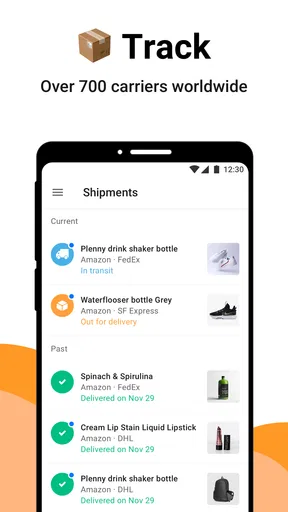
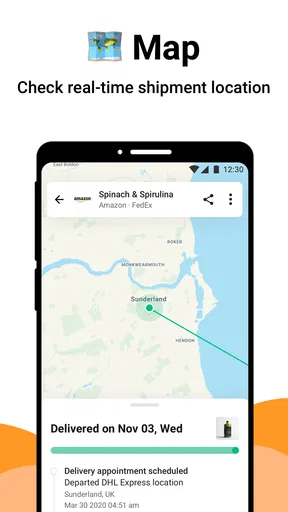
I use AfterShip Package Tracker when my deliveries come from different shops and I do not want to check several carrier pages one by one. It is a free shopping app from AFTERSHIP MOBILE PTE. LTD. that brings shipment updates into one place, covering more than 700 carriers, including familiar names such as UPS, DHL, FedEx, USPS, DPD and Amazon. My overall impression is positive: it makes parcel checking less scattered, although it works best when tracking information is already available from the carrier.
The app has been around since 2014 and feels designed around a simple question: where is my package now? That narrow purpose is its biggest strength. It is not trying to become a full shopping marketplace, a delivery scheduling service or a replacement for every carrier account. Instead, it gives me a central view of orders that would otherwise be spread across emails, retailer pages and separate tracking tools.
How AfterShip Package Tracker works in everyday use
I find the app most useful when I treat its combined shipment view as a way to organize attention, not as a promise that every carrier will report at the same pace. When several parcels are moving, I check the latest update for each and decide which one actually needs follow-up. That habit makes a quiet timeline easier to interpret and helps me save carrier-specific checks for shipments where the details matter.
Readability and navigation that keep the main task clear
When I open a package tracker, I want the current delivery status to be easier to find than the promotional material around it. AfterShip Package Tracker is most useful in that respect because its central job is immediately understandable: add or view shipments, then inspect their progress. That straightforward structure is helpful for people who may find busy shopping apps tiring or confusing.
The app’s value becomes clearer when I have several orders moving at the same time. A pair of shoes might be handled by one carrier, household supplies by another, and an international purchase by a third. Rather than remembering which tracking page belongs to which parcel, I can use one app as a personal delivery dashboard. The carrier names supported by the service make it practical for mixed-order shopping, not just purchases from one retailer.
I also find a consolidated tracker easier to revisit than a long email thread. Email notifications often contain a tracking link, an order number and a large amount of unrelated content. In the app, the shipment itself becomes the object I return to. That reduces the mental work involved in remembering where an update came from, especially when I am checking several parcels during a busy week.
The experience is not equally effortless for everyone. A first-time user still needs to understand how to add a shipment and identify the correct tracking number. If an order confirmation contains several numbers, choosing the right one can be confusing. The app can simplify the follow-up process, but it cannot remove the need to recognize basic delivery information at the start.
For readability, concise status wording matters more than decorative design. A delivery tracker should help me distinguish between an item that has merely been registered, one that is moving through a network and one that needs attention. I would still read the detailed scan history when timing matters, because a short headline status may not explain a delay or an unusual handoff completely.
Useful workflows beyond simply opening a tracking page
One practical workflow is to add a purchase as soon as the retailer provides a tracking number, then use the app as the place to check progress afterward. This is especially useful when I buy from several stores in a short period. I can separate the act of shopping from the later task of monitoring deliveries instead of searching old receipts every time I want an update.
A second useful habit is checking the carrier identity before interpreting a status. Two shipments can show similar wording while following very different delivery networks. Knowing whether a parcel is being handled by USPS, DHL, FedEx or another supported carrier gives the update more context. This is a small step, but it prevents me from assuming that every “in transit” message means the same thing.
I would also use the app as a confirmation tool rather than treating it as an exact appointment promise. If I am expecting a replacement charger, I might check the latest movement before leaving home. If the package is still moving between facilities, I know not to organize my entire afternoon around it. That is a more realistic use of tracking than repeatedly refreshing the screen and expecting a precise arrival moment.
One limitation is that a unified view can make separate carrier systems look more uniform than they really are. The app gathers updates, but the underlying scan frequency and wording depend on the delivery network. A quiet period does not automatically mean the parcel is stuck, and a new scan does not necessarily mean the driver is close. I appreciate the convenience, but I still interpret the timeline with some caution.
Motor and sensory considerations
For users with limited dexterity, a focused delivery app may be easier to manage than repeatedly navigating retailer websites. The task is usually short: open the app, choose a shipment and read the latest information. That reduced sequence can matter when long forms, dense menus or repeated sign-ins create fatigue.
At the same time, tracking workflows often depend on accurate text entry. Typing a long tracking number on a phone can be frustrating, particularly for someone with tremors, reduced precision or difficulty switching between an order email and the app. I would prepare the number carefully, copy it when possible and check every character before assuming that a shipment has failed to appear.
Visual clarity is also important. Delivery histories can contain several events with similar labels, and a user with low vision may need to enlarge text or rely on the device’s own display settings. I would not describe the app as a substitute for system-level accessibility tools, but its limited purpose gives those tools a manageable surface: there are fewer kinds of information to interpret than in a full shopping platform.
For people with sensory sensitivities, delivery tracking can be calmer than opening a retailer app filled with product recommendations, sales banners and unrelated alerts. The narrower focus helps me concentrate on one question. However, tracking information itself can be stressful when a parcel is late or a status changes unexpectedly. The app reduces searching; it does not remove the uncertainty that comes with shipping.
Users who depend on screen readers or other assistive technology should judge the current interface on their own device before making it their only tracking method. I can say that the app’s purpose is relatively direct, but I would not assume that every label, status change or control will work perfectly with every accessibility setup. A backup route through the retailer or carrier remains sensible for important deliveries.
Situational access for real delivery problems
The strongest use case is a household with many small deliveries. Imagine ordering medication-related supplies, groceries that are not urgent, and a birthday gift from different sellers. I can place each shipment in one tracking space and check the relevant item without opening three accounts. That saves time and makes it easier to decide which parcel deserves attention first.
It can also help when I am away from my usual routine. If I am staying with family or working from another location, I may not remember which retailer sent a particular package. A central list gives me a quicker way to review what is moving. This is useful for people who travel, share shopping responsibilities or manage deliveries for relatives, provided they can identify the shipments correctly.
For a person with limited data confidence, the app can serve as a gentler alternative to visiting a different carrier website for every order. The carrier list is broad enough to cover common domestic and international services, and the free price removes a direct cost barrier. The app is rated for Everyone, so it is positioned for general household use rather than a narrow professional audience.
Still, I would not use it as the sole source of truth for a high-consequence delivery. If an important parcel contains time-sensitive documents, a necessary item or something requiring a signature, I would also keep the retailer confirmation and the carrier’s own information available. A tracker is excellent for reducing friction, but the original seller or carrier may provide the most authoritative instructions when something goes wrong.
Another situational trade-off concerns people who only receive an occasional package. If I order one item every few months, opening the retailer’s tracking link may be faster than maintaining a separate tracking habit. AfterShip Package Tracker becomes more valuable as the number of carriers and shipments increases. Its convenience grows with delivery complexity.
Remaining barriers and where another option may be better
The first barrier is dependence on tracking data. If a seller has not supplied a valid number, or if a carrier has not posted a new scan, the app cannot create useful progress by itself. This is easy to forget when a clean interface makes the process feel centralized. I treat the app as an organizer and interpreter of shipment updates, not as a system that controls the package.
A second barrier is ambiguity. A status such as “in transit” can cover a long period, especially when a parcel moves between facilities or crosses borders. Someone who needs a precise explanation may prefer the carrier’s own page, where operational details can sometimes be more specific. The unified view is more convenient, but convenience can come at the cost of some carrier-specific context.
There is also a learning curve for people who do not shop online often. They may need help locating the tracking number, recognizing the correct carrier and understanding why an order can show no movement for a while. I would introduce the app with one uncomplicated shipment first rather than adding every old order at once. That makes the relationship between a tracking number and a status timeline easier to understand.
People who prefer minimal apps may also find a dedicated tracker unnecessary. A carrier’s own application can be the better choice when nearly all deliveries come through that one network, especially if the user needs carrier-specific services rather than a combined overview. Likewise, someone who wants order history, returns and customer support in one place may prefer the retailer’s app.
Version 5.25.6 supports devices running Android 6.0 or later, which makes the stated compatibility broad enough for many older Android phones. Even so, device age, display settings and assistive technology can affect the experience. I would check that the intended phone can run the current app comfortably before moving all delivery monitoring into it.
Who should use it, and who should skip it?
I recommend it to frequent online shoppers, households with orders from several stores and anyone tired of hunting through email for the latest parcel update. It is particularly useful when different carriers are involved, because its central dashboard turns a fragmented task into one repeatable routine.
I also think it suits people who want a free, focused tool rather than a complete shopping ecosystem. The app has reached more than ten million installs, and its average rating is 4.6 from roughly 265,000 ratings, which suggests that the basic tracking idea works well for a large audience. Those figures do not change the need to test the interface against personal accessibility requirements, but they do show that this is an established option rather than an obscure experiment.
I would skip it if I rarely receive packages, dislike entering tracking details or need detailed intervention from one particular carrier. In those cases, a retailer’s order page or the carrier’s own service may involve fewer steps. I would also avoid depending on it alone for a delivery where a missed scan, delay or unclear status could cause serious trouble.
Inclusive verdict after regular parcel checking
AfterShip Package Tracker succeeds because it respects the simple reason people open it: they want to know what is happening with a parcel. Its support for a wide range of carriers, free availability and focused shopping purpose make it a sensible everyday companion for mixed online orders. I find it most comfortable when I use it to organize information, set expectations and decide whether an update actually requires action.
From an inclusive-use perspective, the app benefits people who need a shorter path through delivery information, including users managing several orders or avoiding visually busy shopping platforms. Its main barriers are practical rather than mysterious: entering tracking numbers, interpreting carrier language and coping with gaps in scan data. Those issues can matter a great deal for users with motor, visual, cognitive or situational limitations.
My recommendation is to start with one current shipment and see whether the labels, timeline and controls work well with your phone’s display and assistive settings. Keep the retailer confirmation for reference, and use the carrier’s own channel when the status becomes unclear or the delivery is especially important. Used with those expectations, AfterShip Package Tracker is a genuinely useful central inbox for parcels, not a replacement for the delivery networks behind them.
The developer, AFTERSHIP MOBILE PTE. LTD., has kept the product focused enough that I can return to it quickly without relearning a complicated shopping system. That focus is why I would recommend it to a friend who receives packages from many places. It is less compelling for a single-carrier household, but for scattered online shopping, it makes a repetitive task noticeably easier.
Verdict
Strengths of AfterShip Package Tracker
- Tracks packages from many carriers in one place.
- Automatic delivery updates reduce the need to check courier sites.
- Supports shipment tracking across international destinations.
- Clean interface makes adding and monitoring parcels simple.
- Useful estimated delivery dates help with planning.
Limitations of AfterShip Package Tracker
- Some carrier updates may appear later than on the official website.
- Advanced tracking features may require a paid subscription.
- Push notifications can become excessive for users with many parcels.
- Tracking quality depends on the carrier providing complete data.
- The app may use extra battery when background updates are enabled.
Similar Picks in This Category
View All
SHEIN-Shopping Online
Roadget Business PTE. LTD.4.8

Amazon Shopping
Amazon Mobile LLC4.4


Mercado Libre: Compras online
Mercado Libre4.8

Wish: Shop and Save
Wish US Holdings LLC4.7

Alibaba.com - B2B marketplace
Alibaba Mobile4.4
Frequently Asked Questions
What is AfterShip Package Tracker, and what does it do?
AfterShip Package Tracker is a delivery-tracking app that lets you monitor parcels from multiple carriers in one place. Instead of checking separate courier websites, you can add tracking numbers and view shipping updates, estimated delivery information, and status changes through a single interface. It is particularly useful for people who regularly order from different online stores or receive international shipments.
Which shipping carriers and packages can I track with AfterShip?
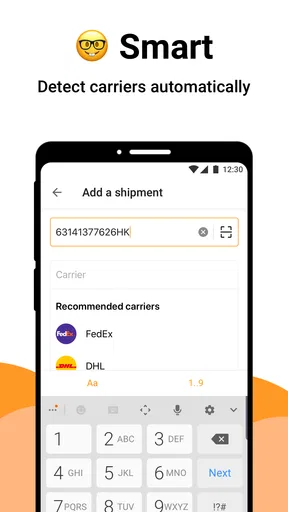
AfterShip supports tracking for a large number of postal services, courier companies, and logistics providers worldwide. In testing, the app generally identified carriers automatically after a tracking number was added, although recognition and update frequency can vary depending on the courier. Some shipments may provide detailed scans, while others may show limited information if the carrier does not share frequent tracking events.
How do I add a shipment to AfterShip Package Tracker?
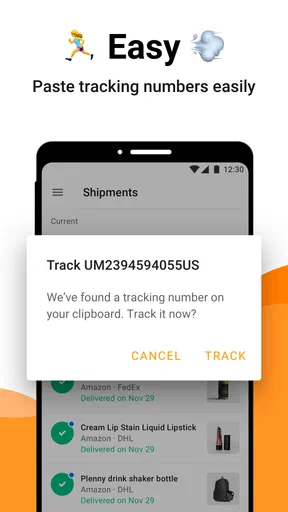
Adding a parcel is usually straightforward: enter or paste the tracking number, allow the app to identify the carrier, and save the shipment to your tracking list. Depending on the version and available integrations, you may also be able to add orders through supported email or shopping-account features. Always check that the tracking number is correct, because the app cannot display updates for an invalid or incomplete code.
Does AfterShip Package Tracker send delivery notifications?
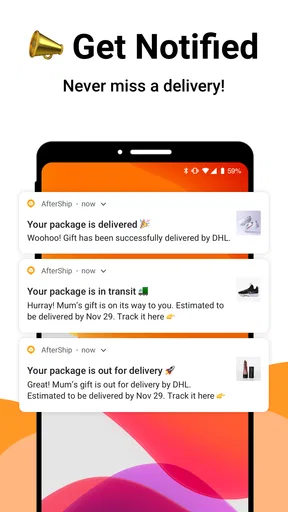
Yes, AfterShip can provide notifications when a shipment changes status, such as when it is in transit, out for delivery, delayed, or delivered. Notification availability may depend on your device permissions, account settings, carrier data, and the app version. If alerts are important to you, enable notifications during setup and review the app’s settings so updates are not blocked by battery-saving or system privacy controls.
Is AfterShip Package Tracker free, and are there any privacy considerations?
AfterShip Package Tracker may be available to download at no cost, but certain features, limits, or subscription options can vary by platform, region, and current app policy. Before relying on premium tools, review the pricing shown in the App Store or Google Play. You should also read the privacy details, since adding tracking numbers, order information, or account connections involves sharing data with the service.
